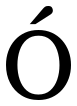
How to type Capital O with Acute
To type Capital O with Acute (Ó), press Alt + 0211 on Windows, holding Alt while typing the digits on the numeric keypad, or press Option + E, Shift + O on Mac, or write Ó in HTML. On any system you can copy it from this page, or enter its codepoint U+00D3 directly: Ctrl+Shift+U then 00d3 on Linux, or 00d3 then Alt+X in Microsoft Word.
Latin Capital Letter O With Acute
- Copy it
- Unicode
- U+00D3
- Windows
- Alt + 0211
| Where | Shortcut | How |
|---|---|---|
| Windows | Alt + 0211 | Hold Alt and type the number on the numeric keypad. |
| Mac | Option + E, Shift + O | Press the keys together. |
| HTML | Ó | Paste this into HTML source. |
| Unicode | U+00D3 | LATIN CAPITAL LETTER O WITH ACUTE |
Other accents symbols
Ó lives in the Latin-1 Supplement block (U+0080-U+00FF), the accented letters and common signs Western European languages needed. Within Unicode it is classified as Lu, an uppercase letter. It has a lowercase counterpart and changes under case conversion. Its bidirectional class makes it left-to-right.
Ó has a decomposed form: it can also be written as U+004F Latin Capital Letter O, U+0301 Combining Acute Accent. The two look identical and are not equal as strings, which is why a search for a word containing Ó sometimes fails against text that was typed on a different system. Everything on this site uses the single-codepoint (NFC) form shown here.
Its lowercase counterpart is ó (U+00F3). They are separate codepoints, so a byte comparison treats them as different characters even though a case-insensitive search does not.
Typing Ó without switching keyboard
Ó is the letter O carrying an acute accent, and it is needed in French, Spanish, Portuguese, Italian, Polish and Czech. It is one character rather than two: a spell checker treats it as a letter of those alphabets, not as O with something added.
Both of the routes worth knowing compose the letter rather than looking it up. On a Mac press Option + E, let go, then press Shift and O: nothing appears until the second key, because the first one is a dead key waiting for a letter to sit under. On Windows the same idea needs the United States-International layout, which turns the apostrophe key into the same dead key. Add that layout once under Language and region, and Ó costs two keystrokes from then on rather than four digits on a numeric keypad.
How Capital O with Acute behaves in software
Ó takes one column in a terminal. It is a left-to-right character, so it holds that direction even inside a right-to-left paragraph.
Every way to write Capital O with Acute
| Form | Value |
|---|---|
| Codepoint | U+00D3 |
| Decimal | 211 |
| UTF-8 bytes | C3 93 |
| UTF-16 bytes | 00 D3 |
| HTML entity | Ó |
| HTML numeric | Ó or Ó |
| CSS | \00D3 |
| JavaScript | \u00D3 |
| Python | \u00D3 |
| URL-encoded | %C3%93 |
| SVG | 00D3.svg · (SIL Open Font License) |
If Ó arrives as Ó
That is this exact character, undamaged: its two UTF-8 bytes C3 93 are being read one at a time as Windows-1252. The Latin-1 range is where this happens most, because it is the range every legacy system thought it already handled. Nothing is lost, and retyping will not help: the fix is at the reading end, which has to be told the text is UTF-8. An empty rectangle is the opposite complaint, and means the encoding is right and the font has no glyph for U+00D3.