How to type Numero Sign
To type Numero Sign (№), press Alt + 8470 on Windows, holding Alt while typing the digits on the numeric keypad, or write № in HTML. On any system you can copy it from this page, or enter its codepoint U+2116 directly: Ctrl+Shift+U then 2116 on Linux, or 2116 then Alt+X in Microsoft Word.
Numero Sign
- Copy it
- Unicode
- U+2116
- Windows
- Alt + 8470 needs regedit
| Where | Shortcut | How |
|---|---|---|
| Windows | Alt + 8470 | Above 255, so Windows will not accept it as typed. Copy the character instead. |
| Mac | N/A | Press the keys together. |
| HTML | № | Paste this into HTML source. |
| Unicode | U+2116 | NUMERO SIGN |
Symbols related to Numero Sign
The Unicode code chart points from № to # and º.
Other symbols
№ lives in the Letterlike Symbols block (U+2100-U+214F), characters built from letters, such as the numero and trademark signs. Within Unicode it is classified as So, a symbol.
What happens to № in a search box
№ is a compatibility character: Unicode says it can be rewritten as No, two separate characters. Anything that normalises text to NFKC before comparing it does exactly that, which is why № pasted into a search field, a URL slug or a username can come back as No and match text that never contained № at all. NFC, the form this site uses, leaves it alone.
How to type № in Microsoft Word and on Windows
In Microsoft Word, type 2116 and press Alt + X. Word reads the four characters before the cursor as a hex codepoint and replaces them, and pressing Alt + X again turns № back into 2116, which is the quickest way to check what a character really is.
On Windows, the Alt code for № is above 255, so Windows will not take it as typed. Press Win + . and use the symbols tab, or copy it from this page.
What Unicode says about Numero Sign
The code chart points from № to Number Sign and Masculine Ordinal. These are the characters the standard thinks you might have meant instead, which makes them the ones worth checking when Numero Sign looks nearly right but not quite.
How Numero Sign behaves in software
№ is East Asian Ambiguous: one column in a Western locale and two in a CJK one. That is why a table that lines up on your machine can break on somebody else's, with no change to the text at all. It carries no direction of its own, so in a line that mixes English with Arabic or Hebrew it takes the direction of the text around it rather than forcing one.
Every way to write Numero Sign
| Form | Value |
|---|---|
| Codepoint | U+2116 |
| Decimal | 8470 |
| UTF-8 bytes | E2 84 96 |
| UTF-16 bytes | 21 16 |
| HTML entity | № |
| HTML numeric | № or № |
| CSS | \2116 |
| JavaScript | \u2116 |
| Python | \u2116 |
| URL-encoded | %E2%84%96 |
| SVG | 2116.svg · (SIL Open Font License) |
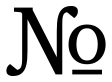
If № arrives as â„–
One character has become three, which is what a three-byte UTF-8 sequence looks like when each byte is read separately: E2 84 96 read as Windows-1252 gives exactly â„–. The text is intact and the damage is in the reading, so setting the reader to UTF-8 restores it and retyping does not. A rectangle instead of the mojibake means the opposite: the encoding is right and the font has no glyph at U+2116, which for a character this far outside Latin-1 is common in older office fonts.