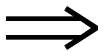
How to type Double Right Arrow
To type Double Right Arrow (⇒), press Alt + 8658 on Windows, holding Alt while typing the digits on the numeric keypad, or write ⇒ in HTML. On any system you can copy it from this page, or enter its codepoint U+21D2 directly: Ctrl+Shift+U then 21d2 on Linux, or 21d2 then Alt+X in Microsoft Word.
Rightwards Double Arrow
- Copy it
- Unicode
- U+21D2
- Windows
- Alt + 8658 needs regedit
| Where | Shortcut | How |
|---|---|---|
| Windows | Alt + 8658 | Above 255, so Windows will not accept it as typed. Copy the character instead. |
| Mac | N/A | Press the keys together. |
| HTML | ⇒ | Paste this into HTML source. |
| Unicode | U+21D2 | RIGHTWARDS DOUBLE ARROW |
Symbols related to Double Right Arrow
These are filed under arrow in CLDR, the keyword list Unicode publishes alongside the names.
Other arrows symbols
⇒ lives in the Arrows block (U+2190-U+21FF), arrows in every direction and weight. Within Unicode it is classified as Sm, a mathematical symbol. Software may lay it out with the spacing an operator expects.
What Double Right Arrow is used for
In mathematical notation ⇒ is a relation: it makes a claim about the two things either side of it, which is true or false rather than a value to work out. TeX gives a relation more space than an operator, and breaks a long line at one in preference to breaking at an operator. That is the classification unicode-math gives it, and it is what decides how the symbol is set: $\Rightarrow$ in LaTeX, in maths mode rather than in a sentence.
Unicode publishes a second list of names for ⇒ in CLDR, the keywords its own search data offers rather than the formal name, and it is rightwards double arrow. That word is what somebody looking for this character is liable to type when Double Right Arrow is not the name they know it by, and the search on the symbol lists matches it as well as the Unicode name.
How Double Right Arrow behaves in software
⇒ is East Asian Ambiguous: one column in a Western locale and two in a CJK one. That is why a table that lines up on your machine can break on somebody else's, with no change to the text at all. It carries no direction of its own, so in a line that mixes English with Arabic or Hebrew it takes the direction of the text around it rather than forcing one.
Every way to write Double Right Arrow
| Form | Value |
|---|---|
| Codepoint | U+21D2 |
| Decimal | 8658 |
| UTF-8 bytes | E2 87 92 |
| UTF-16 bytes | 21 D2 |
| HTML entity | ⇒ |
| HTML numeric | ⇒ or ⇒ |
| CSS | \21D2 |
| JavaScript | \u21D2 |
| Python | \u21D2 |
| URL-encoded | %E2%87%92 |
| LaTeX, in maths mode | $\Rightarrow$ |
| SVG | 21D2.svg · (SIL Open Font License) |
If ⇒ arrives as ⇒
One character has become three, which is what a three-byte UTF-8 sequence looks like when each byte is read separately: E2 87 92 read as Windows-1252 gives exactly ⇒. The text is intact and the damage is in the reading, so setting the reader to UTF-8 restores it and retyping does not. A rectangle instead of the mojibake means the opposite: the encoding is right and the font has no glyph at U+21D2, which for a character this far outside Latin-1 is common in older office fonts.